Agents with purpose and context
Configure instructions, tools and knowledge for each agent. Organize execution around the work that needs to get done.
See how it works Zild Admin
From configuring your first agent to expansion across departments, bring people, models, knowledge and systems together. Give teams autonomy with defined access and operational visibility.
Configure instructions, tools and knowledge for each agent. Organize execution around the work that needs to get done.
See how it worksConnect AI providers, CRM, ERP and channels with your company’s credentials. Centralize configuration of the integrations your agents use.
See how it worksOrganize knowledge bases to give agents context and support answers grounded in company information.
See how it worksManage users, groups and roles. Define permissions so each person has access appropriate to their responsibilities.
See how it worksReview imported costs by connection and period, provider coverage and the latest synchronization. Compare amounts with the invoice before deciding.
See how it worksManage queues, workspace settings and subscriptions in one shared place for teams operating the platform.
See how it worksExplore improvements and how to use them. Availability depends on your deployed version and environment configuration.
Monitor imported costs, coverage and synchronization per connection, keeping the Zild subscription separate from API usage.
Choose the models enabled for your company and configure an alternative for temporary provider failures.
Filter operations by period, user, activity and result, and export your company's records.
Review knowledge-base material using the knowledge-file download action.
Use configuration templates as a starting point and adapt the agent to your company's process.
Configure the WinThor integration and the operations the agent is allowed to execute.
Connect logistics data to the agent and record package measurements under pickup-specific rules.
Configure tools to load customer context, look up rides and request a new ride. The request contract also supports forwarding an e-ticket code and password when supplied by the workflow.
Configure success criteria and how to estimate financial benefits from successful conversations.
Generate Excel or CSV files from filters described in agent or workflow instructions.
Integration management received presentation improvements and connector deletion support.
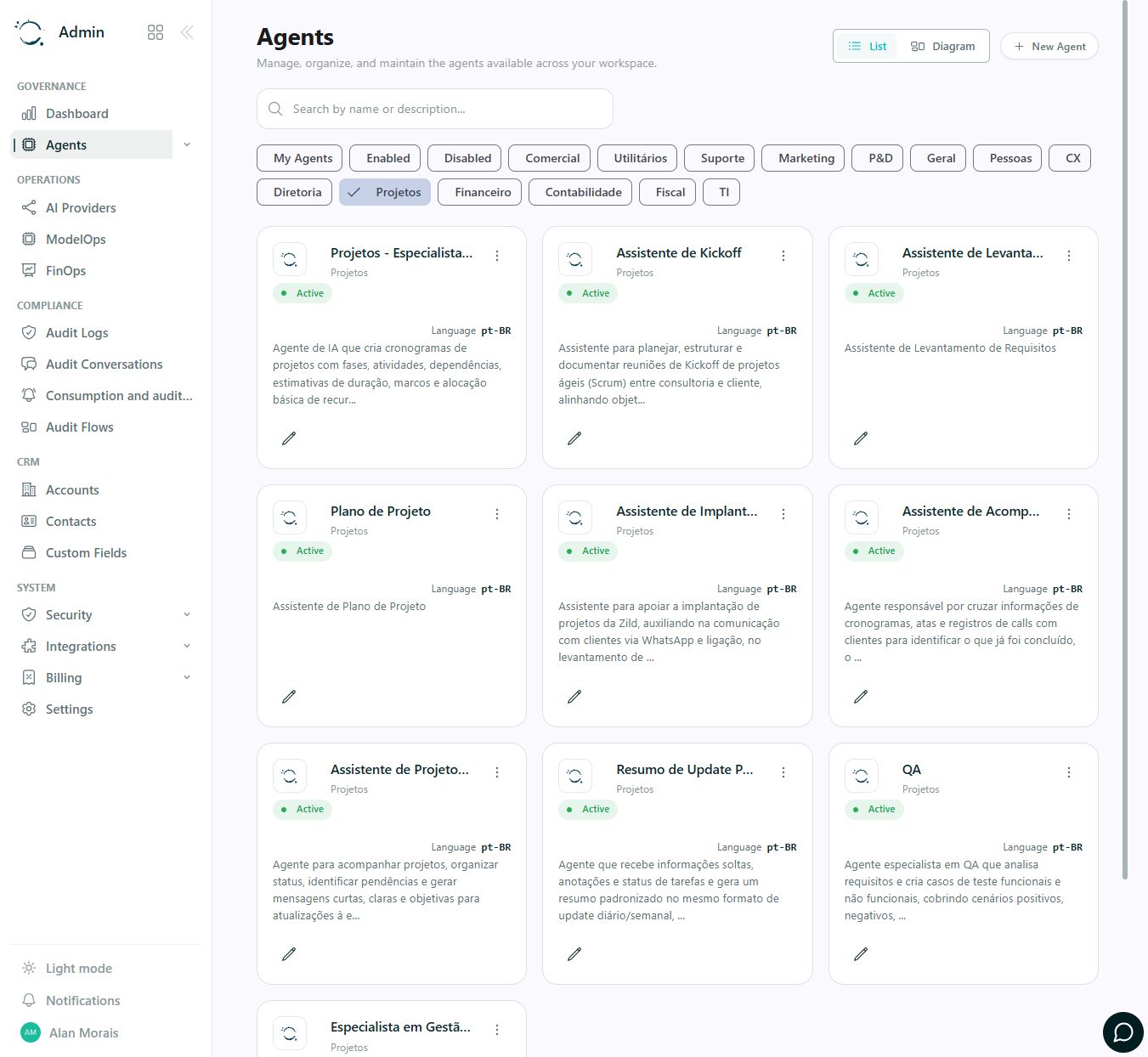
An area-based view to find agents, check their status and access configuration. In this actual capture, the Projects category groups agents for schedules, implementation and follow-up.
Configure provider credentials and connect the systems you need.
Define the agent, its instructions, tools and knowledge bases.
Distribute access, responsibilities and queues across teams.
Review usage and history, investigate errors and refine operations.
Your company configures its own API keys. Provider usage is billed separately from the Zild subscription.
Connect agents to your AI providers, CRM, ERP and collaboration tools. Retrieve information, update records and move processes forward in the systems your team already uses.
 OpenAI
 Anthropic
 Google Gemini
 AWS Bedrock
 Salesforce
 HubSpot
 SAP Business One
 Omie
 Microsoft Teams
 SharePoint
 monday.com
 MCP
Use your company’s credentials and enable the access required for each integration.
FROM APP TO PROCESS
These guides help define data, integrations, responsibilities and acceptance criteria for your configuration.
Organize pilot access, knowledge and tools. Define which sources and revisions the agent may consult before expanding use.
Plan this process: A foundation for engineering agentsTurn an initiative inventory into agents with owners, permissions and evaluation criteria. A Shadow AI inventory requires its own discovery work.
Plan this process: From scattered use to shared managementTalk to Zild to map agents, integrations and responsibilities for your operations.
Talk to an expert